

Bank reconciliation means checking the transactions on your bank statement against the money in and out recorded for your business. Take a bank transfer, find the payment it relates to and check that you recorded it once, in the right account and for the right amount. Then check that the balances agree too.
An invoice marked as paid and a balance that looks reasonable are useful clues. To finish the check, you need to explain the transactions and any differences: a part payment leaves money still to collect, a bank fee is a cost, and a transfer between your own accounts moves money you already own.
This guide, also as a PDF
Subscribe to the newsletter: once you confirm from the link in the email, the PDF guide opens.
This site is protected by reCAPTCHA and the Google Privacy Policy and Google Terms apply.

Start with the same account and period
Choose one account and a specific period, such as 1 to 31 October. Have the statement, your records for that account and the supporting documents ready: invoices, expenses and transfer receipts.
Check the opening balance before matching individual rows. If you start 1 October with €2,000 at the bank and €1,900 in your records, there is already a €100 difference to investigate. October's transactions alone will not explain where it came from.
Use the same currency and compare balances for the same date. Take the statement balance, which includes posted transactions, rather than the available balance in your banking app. If a row has both a transaction date and a value date, these are two dates for the same transaction, not two payments.
If you are using an export, check its date range and filters too. A file containing only incoming payments cannot explain the account's closing balance.
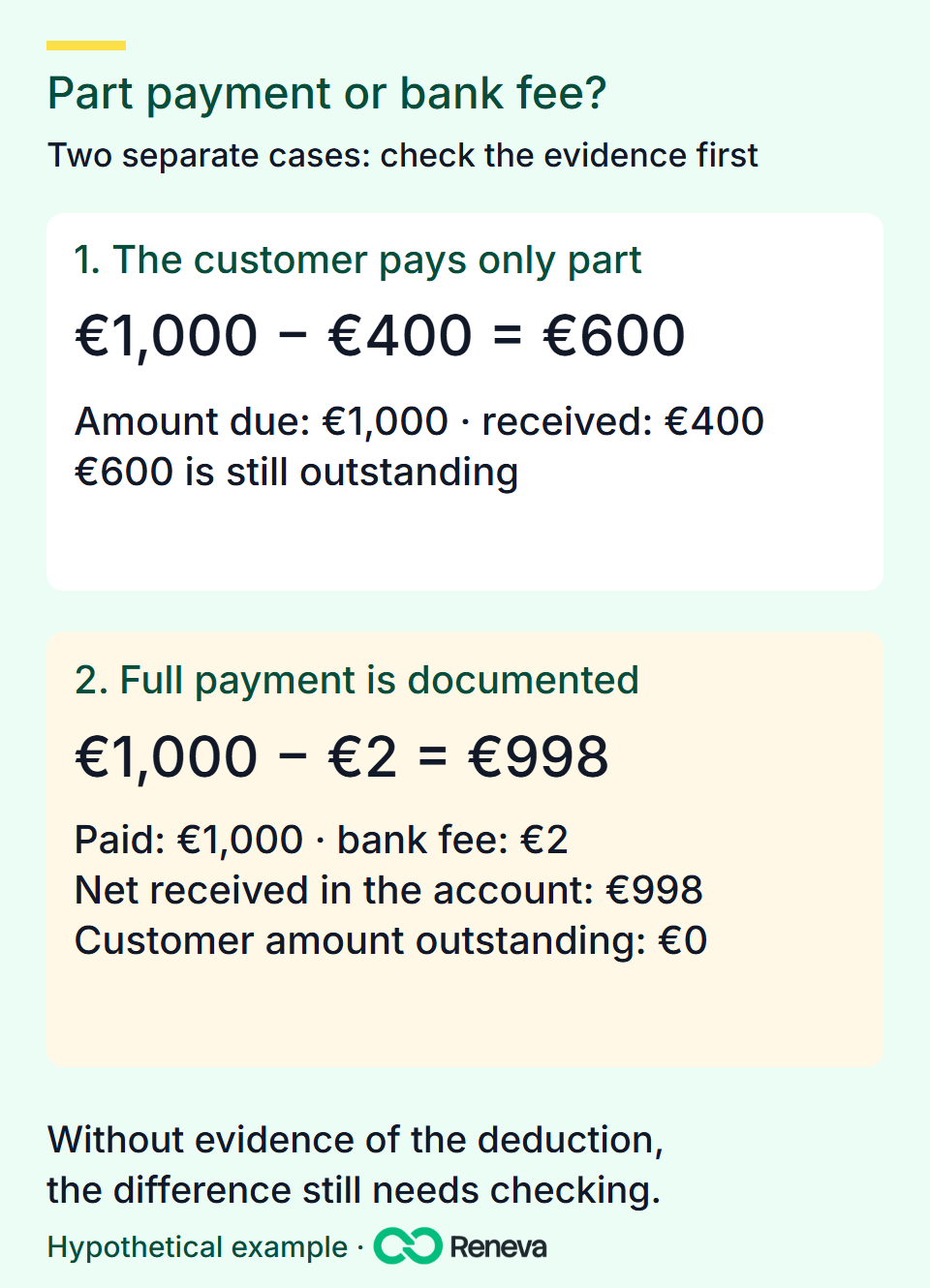
In Reneva's Accounting records, you can import a bank statement CSV and choose the account. Transaction date is always required. For amounts, map either a single Amount column or separate Money in and Money out columns. The counterparty and bank reference help you recognise payments. Keep the opening and closing balances for comparison: balance rows are not imported as transactions.
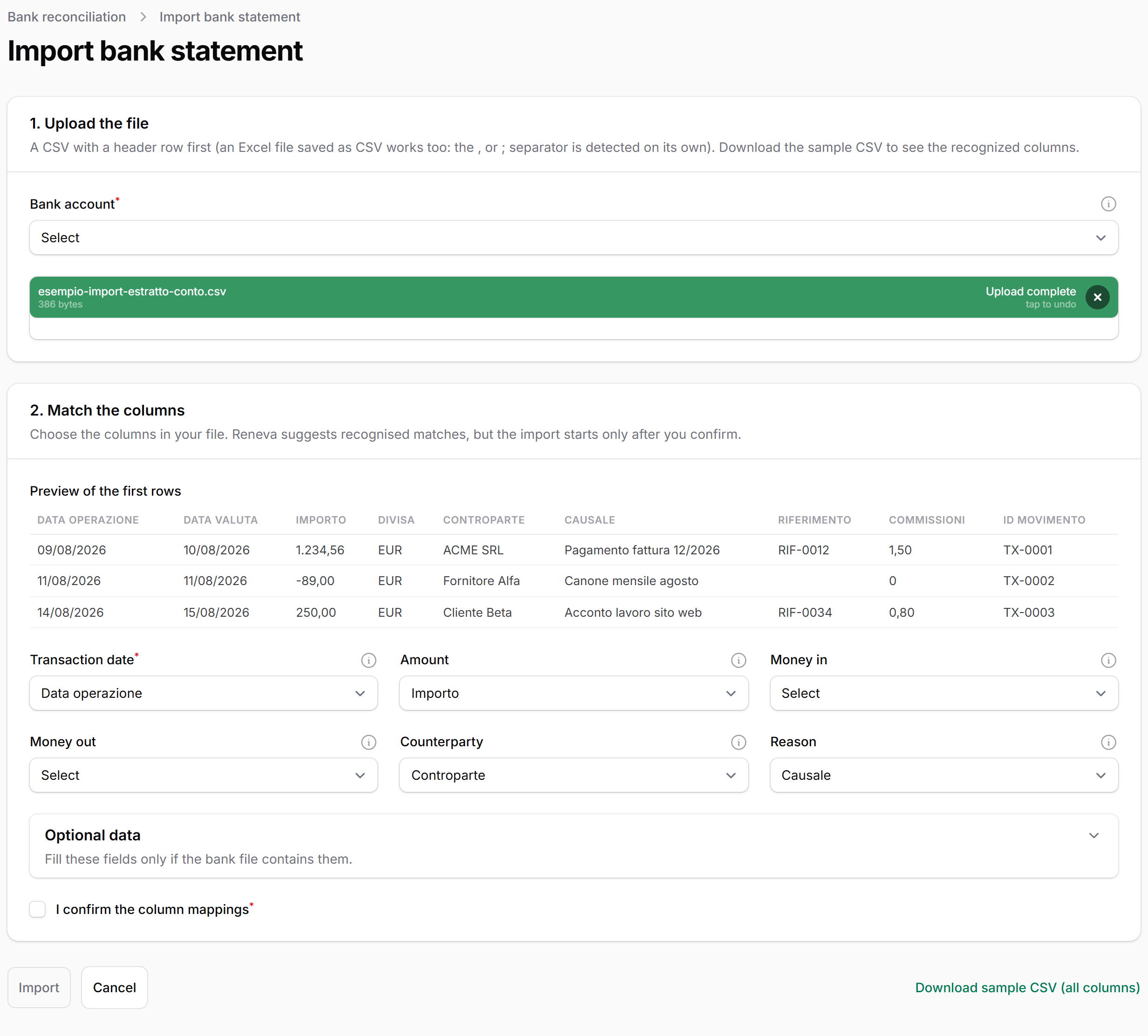
A worked example: from €2,000 to €2,895
Consider this hypothetical statement. The amounts illustrate the check; they are not a real client's data.
| October date | Statement entry | Amount or balance | Supporting record to find |
|---|---|---|---|
| 1 October | Opening balance | €2,000 | Previous period's closing balance |
| 3 October | Transfer from client A | +€1,200 | Invoice and payment reference |
| 12 October | Payment to supplier B | −€300 | Expense and completed payment |
| 31 October | Bank fee | −€5 | Bank charge and its details |
| 31 October | Closing balance | €2,895 | Statement's closing balance |
The calculation is €2,000 + €1,200 − €300 − €5 = €2,895.
Your records contain the €1,200 receipt and the €300 payment, but the fee is missing. Starting from the same €2,000, your recorded balance is €2,900: €5 higher than the bank's.
Find the charge, check its details and record the missing cost in the correct account and period. Your records now reach €2,895 too. You have explained the difference with a specific transaction. A general €5 adjustment would have hidden the reason.
A matching closing balance is still only an overall check. Two errors can cancel each other out: omitting a €100 receipt and a €100 payment leaves the same balance. You need the row-by-row matches as well.
How to identify the right payment
For the €1,200 transfer, compare amount, date, counterparty and reference. The amount narrows the search, but does not identify the invoice on its own: two invoices could have the same total.
Read the bank reference, compare the document number where available and check who made the payment. If the date differs from your note, inspect the receipt or transaction details before deciding that a receipt is missing. Ask the client for details if the reference is unclear.
In Reneva, you review suggested matches and confirm them. Bulk confirmation applies to rows that exactly cover one due date and have a recognised counterparty or a unique reference. Check other rows individually: a suggestion helps you find the payment; confirmation follows your check.
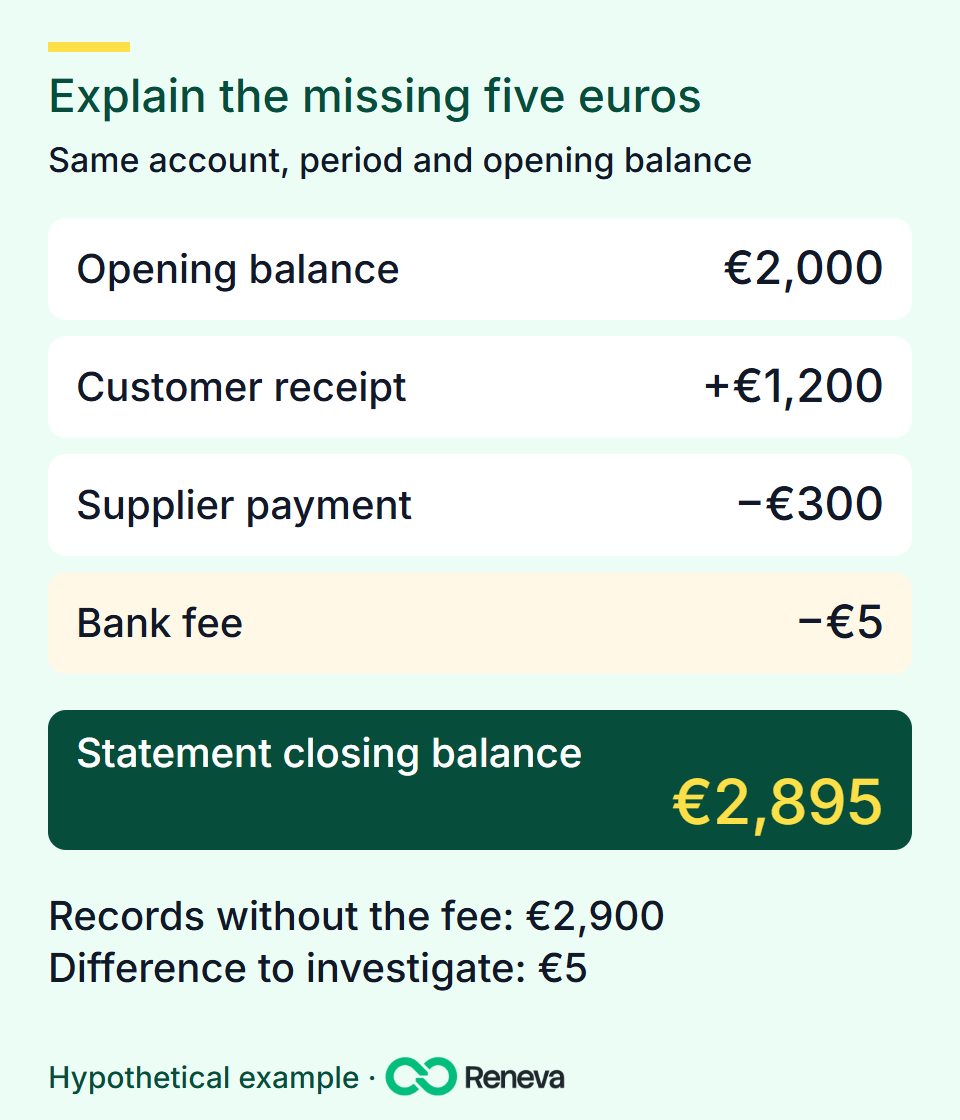
A different amount: part payment or bank fee?
The following examples are separate from the October statement. Each shows a different decision when the amount received differs from the amount due.
You receive €400 of the €1,000 due
The client makes a €400 part payment towards €1,000 due. Check that the transfer relates to that document and record the €400 received. There is still €600 to collect: a part payment does not reduce the agreed total.
In Reneva, matching a receipt below the amount due leaves the remaining balance open. That is what you will look for when the next payment arrives.
You receive €998 and the bank keeps a €2 fee
The document is still for €1,000, but the transaction details prove that the client paid the full amount and the bank kept a €2 fee. Separate the €1,000 payment from the €2 cost: €998 reaches the account, and the client does not owe another €2.
In Reneva, match €1,000 to the due date and enter €2 in Withheld fee. The document is paid in full and the account balance increases by €998.
Without that evidence, €998 could be an incomplete payment. Do not classify a difference as a fee simply because it is small. Find the bank details or the client's explanation and leave anything unresolved open for investigation.
The transaction is already recorded, or comes from your own account
Before recording an imported row, check whether you already entered that payment. You might have recorded a receipt manually when the transfer arrived and then found it again in the CSV. The bank shows one receipt; creating another would count it twice in your records.
If you have already recorded that payment, link the imported bank row to the existing entry rather than creating a second transaction. In Reneva, use Already recorded to link the row to the existing transaction.
Before choosing the action, compare:
- The account the money went through.
- The direction: money in must match money in, and money out must match money out.
- The amount, which must be the same, and the dates, which must be close together.
Reneva can make the link if it finds the existing transaction and that transaction is not linked to another bank row. Still check that it is the same payment: two identical transfers can be separate transactions.
Another case is moving €200 from your main business account to a second account you own. One statement shows €200 going out, the other shows €200 coming in. Your total money has not increased, and no client has paid you.
Check both statements and the destination account. In Reneva, choose Account transfer and the account involved: both sides of the transfer are recorded. When reconciling each account, include its incoming or outgoing transaction. Do not allocate it to an invoice or record it a second time when checking the other statement.
| What you find | Evidence to look for | How to treat it |
|---|---|---|
| €400 received against €1,000 due | Document reference and part-payment agreement | €400 received, €600 outstanding |
| €998 received against €1,000 due | Full payment and a documented €2 fee | €1,000 payment and €2 cost |
| A transfer already entered | The same payment in the statement and your records | Link the existing transaction |
| €200 from your own account | Outgoing and incoming entries on the two accounts | Account transfer |
What to leave open for investigation
At the end, start from the opening balance, add the money received during the period and subtract the money paid out. Compare the result with the statement's closing balance, then return to the rows you have not explained.
If a payment recorded at month-end appears on the next month's statement, keep both references and check the date. The difference may come from the periods being compared; do not invent another transaction to make it disappear.
For each unresolved item, note the account, date, amount, expected document and next check. “€998 transfer: fee details missing” tells you what to find. “€2 difference” leaves you starting again at the next reconciliation.


