

Reneva is management software for freelancers and agencies that sell services. It keeps the work you sell, the documents you issue and the money you are owed in one place, so at the start of the day you know what needs doing and who still has to pay you.
This article opens “Reneva news”, the part of the blog where we talk about the product: what it does and what changes. Here’s the full tour, one section at a time.
Where we start
People who sell services work to two rhythms. There is work you deliver once, such as a website, a consultancy project or a campaign. And there is the service that comes back every month or every year: maintenance, hosting, social media management. The client is often the same, but the questions change. For the first you want to know how much you have already invoiced; for the second, which month is missing.
The answers usually live in different places: the quote in a folder, the due dates in a calendar, the invoices in the invoicing tool, the payments in the bank statement. The thread that joins them is in one person’s head. It works, until that person goes on holiday.
Reneva starts from three questions: what needs doing, what can you invoice, who still has to pay? Everything else is built around them.
Reneva in brief
Reneva is online management software. You use it in the browser, on your computer and on your phone.
Inside are the parts that make up the work of anyone who sells services: clients, subscriptions, projects, documents, payments, expenses, hours. They are linked to each other, so the invoice knows which project it comes from and the payment knows which instalment it settles. In one account you can look after several companies, each with its own tax regime, its own modules and the people who work in it.
There are three ways in. Your team signs in with the roles you set, your accountant has a portal of their own, and your client opens their documents in the client portal. Documents come out in Italian or in English, and you choose per company.
The work: subscriptions and projects
A subscription is a service that renews. With subscriptions, Reneva prepares the document for the period on the days you choose and shows you which months are invoiced, paid or overdue.
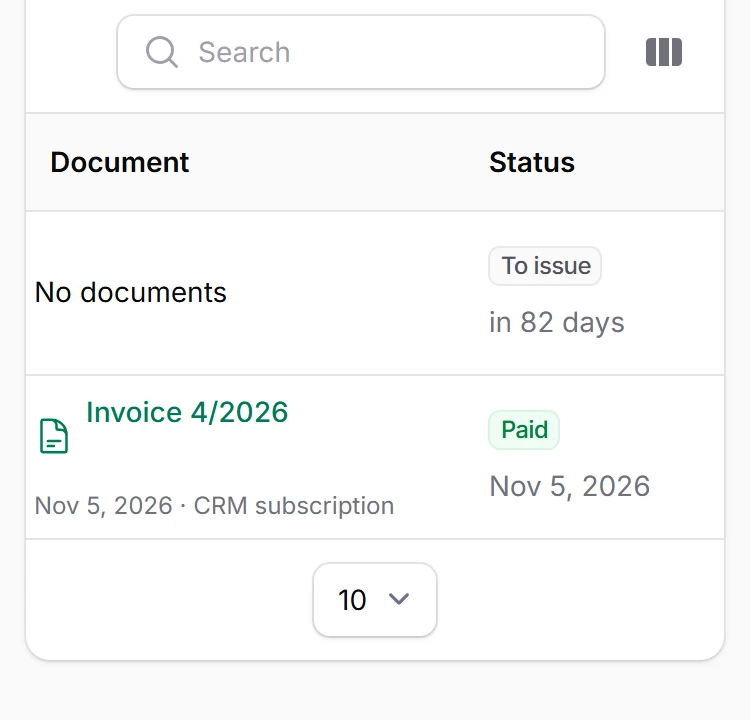
A client project is work you deliver. It has its own line items, tasks, an expected delivery date and a price you can split into a deposit and a balance. You invoice each instalment when it is due and see what is still to be collected.
You write your prices once in the Price list, with the cost next to them, and reuse them in subscriptions and projects. You track hours with the Timer, as you work or afterwards, and compare them with the hours you planned. When there’s an image, a PDF or a web page to approve, Reviews lets the client comment on the exact spot they want changed, and earlier versions are kept.
It all ends up in the client record: contacts, subscriptions, projects, documents and payments.
From quote to invoice
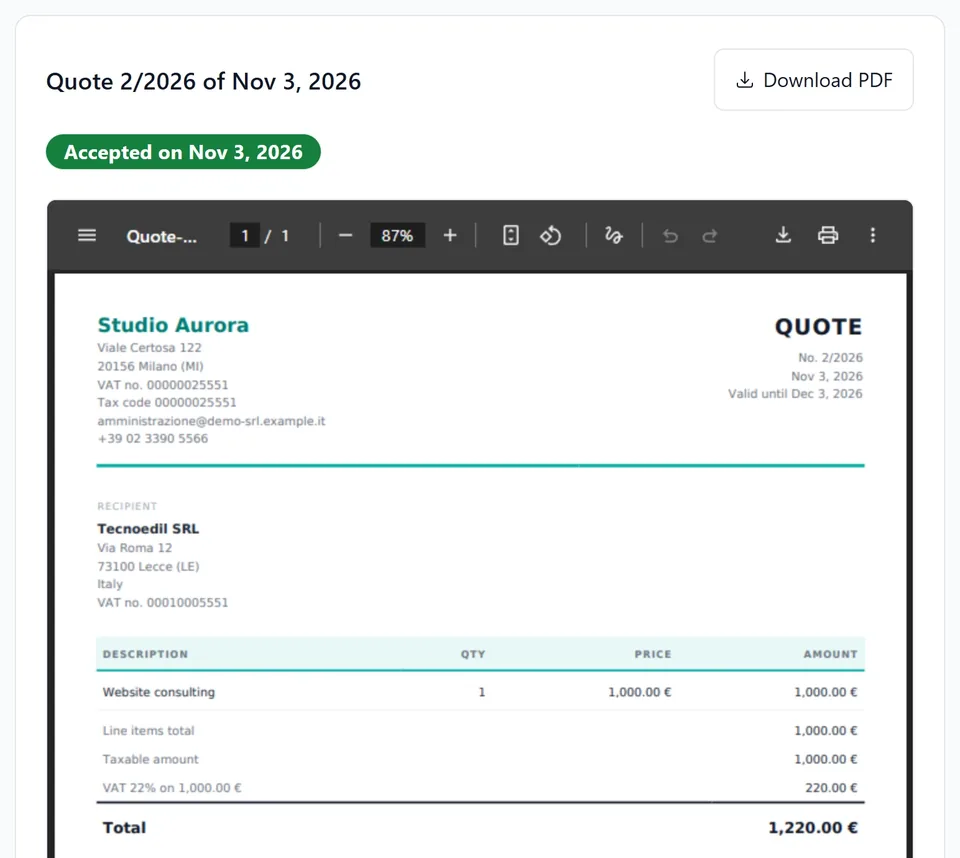
Quotes, invoices and receipts come from the line items of your subscriptions and projects, so you don’t retype what you agreed. Which documents you issue depends on the company’s tax regime. Reneva covers the Italian flat-rate regime (forfettario), the ordinary regime and occasional services, each with its own documents; for a company outside Italy there’s a configurable tax. On the plans that include them, e-invoices go through the Sistema di Interscambio (SdI), the Italian Revenue Agency’s exchange system.
You send the client a link. They open it in the client portal, which carries your business name and logo. There they find their documents, accept the quote and, if you have connected Stripe or PayPal, pay online.
Invoiced doesn’t mean collected
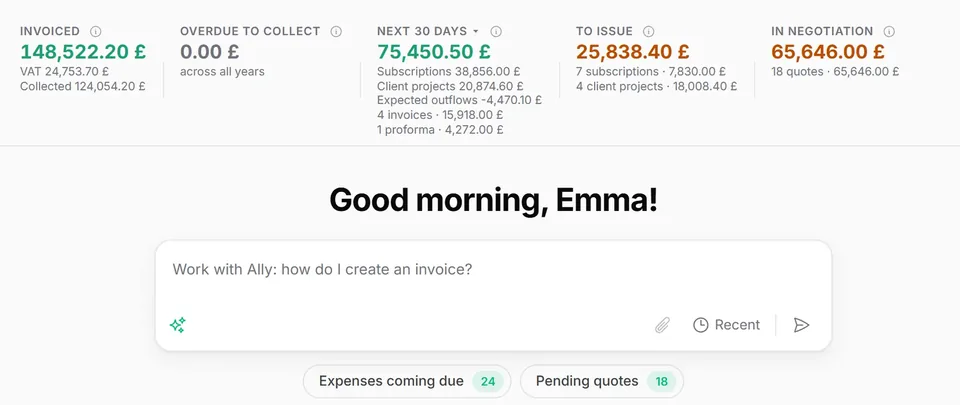
In Reneva, invoiced and collected are two separate figures, because an invoice you’ve issued isn’t yet a payment in your account.
You record incoming payments instalment by instalment and see what is missing. The same goes for money going out: expenses, one-off or recurring, which you can split into instalments and follow through to payment. You upload your bank statement as a CSV file and match it to documents and expenses.
The Dashboard opens the day with invoiced, collected and overdue amounts, plus the priorities for your role. Analysis compares two periods and shows how much your biggest clients weigh on subscriptions and where the hours go. From Records you export transactions for your accountant. Payment reminders go out on the days and in the words you choose, and stop once the invoice is paid.
Your team: a role for each person
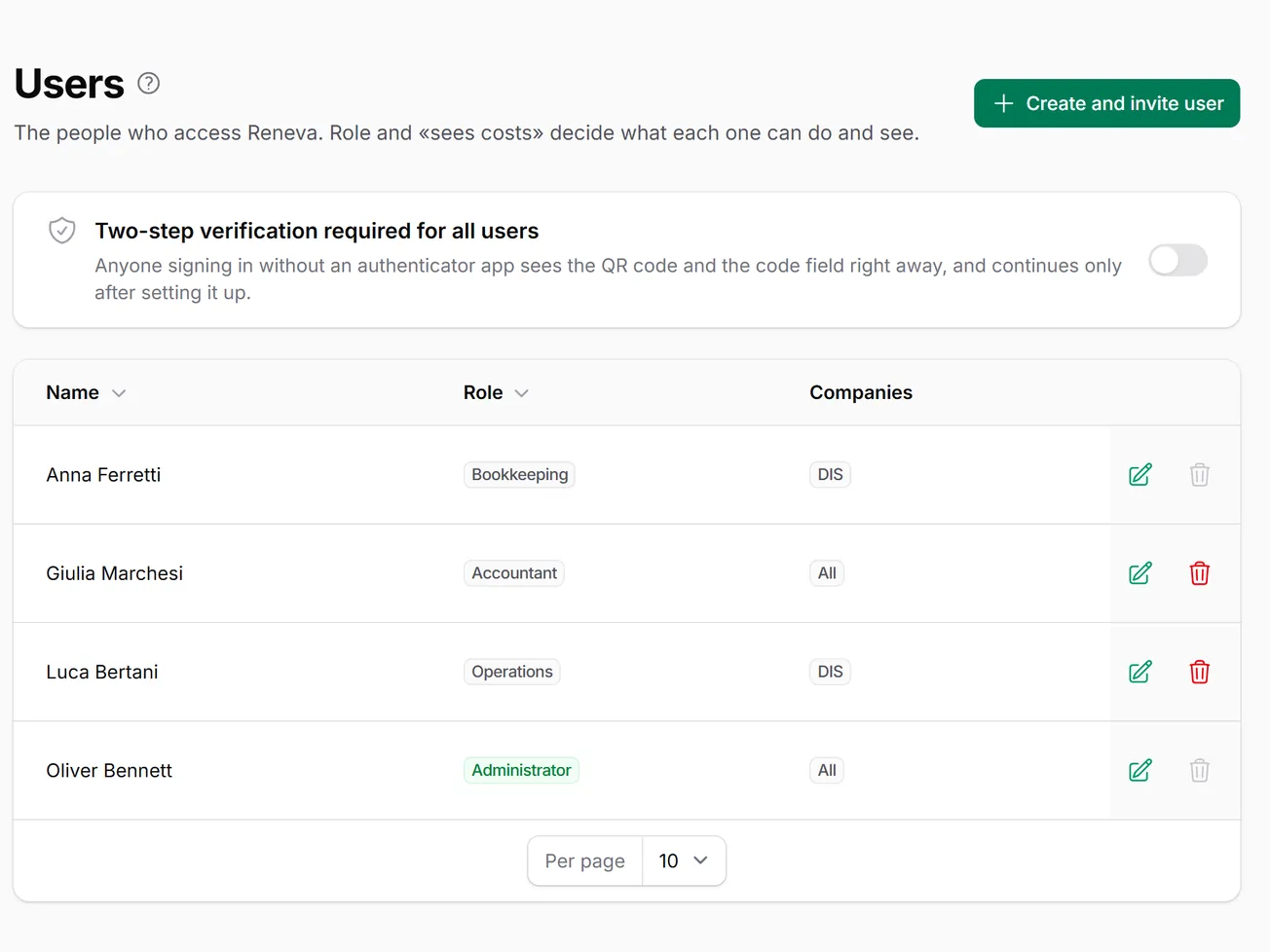
At an agency, not everyone needs to see everything. Someone who looks after three clients has no need for the company’s accounts, and whoever keeps the books shouldn’t be touching the projects. In Reneva you decide this with roles.
A role says, section by section, what the person who holds it can do. There are three levels: Hidden removes the section from the menu, View opens it read-only, Edit gives full access. You create the roles your agency needs once and assign them to several people. When someone’s responsibilities change, you give them another role: you don’t redo the permissions from scratch.
The numbers have a permission of their own. “Sees costs and margins” shows “My cost” and the margins of subscriptions and client projects; “Sees the analysis” opens Analysis. Leave them off and someone can prepare the subscription while only you see the margin.
Then there is the data scope. With “Only the clients they follow”, a person sees everything about their clients (subscriptions, projects, documents, payments and emails), only their own hours, and nothing about other people’s clients. Whoever coordinates gets the scope across all the company’s clients. You say who follows a client in the client’s record.
If you have several companies in the account, you also choose which ones each person can open. The Administrator sees them all, and only an Administrator can appoint another.
To bring someone in, you create the user with the role and the companies already chosen. They receive a personal link to set their password, single-use and valid for seven days; if they can’t find it, you send it again. An invitation that hasn’t been accepted yet doesn’t take a seat in your plan. When you give someone a client or a client project, they’re notified automatically. And with one switch you require two-step verification for everyone in the account.
How many people you can invite is on the Pricing page.
Your accountant
With an accountant, things usually travel by email and the documents end up in folders. In Reneva you invite them: you choose the Accountant role and enter their email and the companies to follow. Their access is included in your plan and uses one of its seats.
They sign in to a portal of their own, with their own registration, and find every company that has given them access. For each one they open documents and records without having to ask you for anything.
You write to each other in tickets: a short subject, a message, up to ten attached files per message. Requests and replies stay in the same exchange, and the search also finds words inside messages, so the reply from months ago turns up. If the invoice for an expense that still has no document arrives in a ticket, you attach it to the expense from there.
If you’re on the flat-rate regime (forfettario), the year’s figures behind the tax and contributions estimate are prepared and published by your accountant. When a number doesn’t add up, “Ask your accountant” opens a ticket with the year and the values you are looking at.
Access stays in your hands. You decide which companies they follow and remove them whenever you like. You can have more than one, too: when you open a ticket you choose who to write to.
A modular system: switch on only what you use
Reneva has a section for every part of the work, but it doesn’t ask you to use them all. Each section is a module with its own switch: you turn it on when you need it and off when you don’t, and the menu shows only what is on.
That is why the same software suits someone taking their first steps with occasional work and an agency with colleagues, roles and several companies. If you are starting out, you can keep client projects on and little else: you prepare quotes and receipts, follow your payments and have a short menu in front of you. An agency turns on subscriptions, hours, expenses and reviews, and gives each person their own access. When the work changes, you change the switches.
The choice is made per company, by an administrator: with two companies you can have the Timer on in one and off in the other. A new account starts with every module on, and the guided setup introduces them one by one. Turning a module off deletes nothing: the data stays, and it is there when you turn the module back on. Modules also reach beyond the menu, because the Dashboard tiles, the Analysis tabs and the alerts follow what you have switched on.
Clients, the Dashboard and documents are always there. You choose the other eight yourself: Subscriptions, Client projects, Price list, Timer, Internal projects, Reviews, Expenses and Calendar.
Reneva’s modules
Subscriptions
For services that renew: maintenance, hosting, social media management, a monthly retainer. Each subscription has its client, its frequency and its due dates, and one client can have more than one, such as a monthly retainer and the yearly domain renewal.
Reneva prepares the renewal document (a pro forma, an invoice or a receipt) the number of days you choose before the due date and sends it to the client; if you prefer, you issue it yourself whenever you like. For each period you see whether it is invoiced, paid or overdue. Next to the amount you find your cost, your team’s hours and the margin that is left. A service that stops can be paused and started again.
It is useful if you live on recurring services and want to know what the month is worth and what falls due in the next thirty days.
Client projects
For one-off work: a website, a campaign, a consultancy job. A client project starts from an accepted quote or from price list items, with the client already in place.
It has an expected delivery date, separate from the payment dates, and a fee you split into instalments: a deposit and a balance, or as many as you need. You invoice each instalment when its time comes, and once you record the payment the instalment shows as paid. The list keeps the status of the work and the status of the money in two columns, because a project can be delivered and not yet paid. When the work ends and the service carries on, a project line becomes a draft subscription.
Price list
This is where you write the services you sell, once. Each item in the Price list has a category, a description, a price and “My cost”, which is what that service costs you: you read the margin next to the price.
When you pull an item into a subscription or a project, Reneva copies the description, price, discount and cost into the line. It is a copy, not a link: if you raise a price, the agreements you have already made stay as you agreed them, and the new price applies to the items you add from then on. A cost that covers several clients, such as hosting, can be marked as a shared cost and, where seats are limited, split per seat.
Timer
It tells you how much time goes into each piece of work. With the Timer you start the clock on a subscription, a client project or an internal project as you work; hours you forgot can be added by hand later. Only one timer runs at a time: start another and the previous one stops.
Each task can have its planned hours, and Usage compares them with the hours recorded: 3 hours out of 6 is 50%. The project’s rate, or the rate of its category, gives the hours a value in money. There is also a Chrome extension that puts the timer in your browser toolbar.
It suits you if you work at a fixed price and want to understand what a job really cost you, alone or with a team.
Internal projects
For work you don’t invoice: training, the agency’s own website, a product of yours. An internal project is split into tasks, each with a category, a person and its planned hours.
The time comes from the Timer and never turns into a line to invoice: it stays a cost, which you read in money at the rate you have set. A project that comes back every year, such as bringing a new colleague on board, can be duplicated with its structure, and the copy starts again with no hours and no history. When the work is finished you archive it, and the recorded hours stay in the summaries.
Teams turn it on when they want to see how many hours go into the things that never end up on an invoice.
Reviews
It gets a piece of work approved by the client. With Reviews you share an image, a PDF or a web page through a private link; the client comments on the exact spot, with a numbered pin, then approves or asks for changes.
Each correction is a new version. The earlier ones stay available with their comments, and the client’s link always opens the latest, so you don’t have to send a new one. The decision stays on the version, with its date, and the history lists every step with day and time.
Expenses
What you have to pay your suppliers, and what you have already paid. In Expenses you upload the supplier’s invoice and Reneva reads the details and suggests them: supplier, items, amounts, due date. A valid invoice that arrives from the SdI becomes a recorded expense on its own.
Expenses that come back, such as software and licences, are recorded once with a frequency and a start date, and the due dates for each period are prepared for you. Every expense can be split into instalments and has its status: to pay, partly paid, overdue or paid. The data your accountant needs comes out in Records.
For anyone with suppliers and freelancers to pay who wants to see money going out next to money coming in.
Calendar
It puts every due date in one place: to issue, to collect and to pay, together with your team’s tasks. In the Calendar each due date shows its status, the client or supplier and the amount, and one click takes you to its record. You change the date there: in the calendar it is read-only, so it can’t be moved by mistake.
You add reminders of your own, and you can ask Ally to add them. If you connect Google Calendar or Outlook, the events come into Reneva, so meetings and due dates sit in the same view.
It is useful if you want to open the week knowing what to invoice, who has to pay and what you have to pay.
Ally, the assistant
Ally is Reneva’s AI assistant: a chat that works with the data and the sections you already use.
It answers from your figures. “Who still has to pay me?” “How much did I spend per supplier in 2025?” Ally reads lists, due dates, subscriptions, hours, payments and expenses with the same filters and the same totals you see, and under the answer it writes “Read from”, showing where the data came from. If a list is longer than what it has read, it tells you. Type the name of a client or an invoice and it opens the record.
It prepares the forms. You describe a quote with the client, the services and the amounts. Ally finds the client, looks in the Price list first for each line, asks only for what is missing and opens the form already filled in. It does the same for expenses, clients, subscriptions, hours and reminders. You check, correct and save: until you save, nothing is created, issued or sent.
It reads files. In the chat you attach PDFs, images, CSV and XML files and XLSX sheets, and it uses them to prepare the form. In Expenses, “Upload invoice” reads the supplier’s document and suggests the supplier, amounts, due dates and items; what it can’t read stays empty. In CSV imports it suggests how to match the columns. In bank reconciliation it recognises who paid even when the payment reference is abbreviated: Reneva works out the amounts and what is left, and the confirmation stays with you.
Ally also drafts renewal and reminder emails for you to review and copy. Where voice is available, you talk to it instead of typing. And if you need a person, it can offer you an operator, who replies in the same chat.
A few rules on data. Each AI feature is switched on separately. Access to company data is off by default and an administrator turns it on: while it is off, Ally answers questions about how to use Reneva, from the Guide. It uses the permissions of whoever is asking, so if your role doesn’t see costs and payments, you won’t get them from Ally either. What it learns from the things you tell it stays in a table, which you can correct or delete.
The tools you already use
Reneva connects to your Google or Outlook calendar, imports data from Fatture in Cloud, CSV or XML, and sends emails from your own address. To connect other software there are APIs, webhooks and MCP, the protocol AI assistants use to connect.
On your phone you use it in the browser or add it to your apps.
Who it is for
Freelancers and agencies that sell services, one-off or recurring: websites, campaigns, consultancy, maintenance, social media management. You might work on your own, with a group of freelancers or at an agency.
Reneva covers three Italian tax regimes, each with its own documents: occasional services for people without a VAT number, the flat-rate regime (forfettario) and the ordinary regime. When the work grows you don’t change software: you switch on one more module.
Before you start
Can I bring in the data I already have?
Yes. You import clients and documents from Fatture in Cloud, once, or from CSV and XML files, and you see a preview before you confirm. The documents you bring in keep their original number.
Who sees what?
You decide, with roles and permissions per section: for each person a section is hidden, view-only or editable. Everyone can turn on two-step verification.
Can I take my data back?
Yes. Reneva lets you download all your data, clients included.
Which language and currency do my documents use?
You choose the language per company, Italian or English, and it applies to the PDF, the email to the client and the portal. The currency follows the company’s country: euro, US dollar, pound sterling, Swiss franc, yen, Canadian dollar, Australian dollar or Indian rupee.
How to try it
You can try Reneva free, with no credit card. The length of the trial, the plans and the prices are on the Pricing page: your company’s tax regime decides the plan.
Who publishes Reneva and how we handle data are covered in About us and Security.
One suggestion: try it with this month’s work. A real subscription, a real project, an invoice you’re still waiting on. That’s where you see whether the numbers add up.


