

To switch invoicing software, list what needs to remain accessible, check how it can be transferred and agree when to start handling new work in the new tool. Then compare documents and outstanding amounts, keeping track of payments that arrive afterwards too.
The aim is to carry on working while knowing where each piece of information lives. An inventory and clear responsibilities help you complete the move and identify anything that still needs an answer.
This guide, also as a PDF
Subscribe to the newsletter: once you confirm from the link in the email, the PDF guide opens.
This site is protected by reCAPTCHA and the Google Privacy Policy and Google Terms apply.

List the data, documents and services you use
Start with the companies and years you manage. For each one, gather:
- the clients and suppliers you need to find again;
- issued and received documents, with the original files available;
- due dates, payments and outstanding amounts;
- the settings used for new documents;
- the people, advisers and connections needed for the work.
Keep the data to transfer separate from the services to check with the provider. Archive access, receiving documents, legal archiving and support each have their own conditions.
In our fictional example, Chiara coordinates the move for three people at Studio Alfa. The initial inventory contains:
| Year | Sales documents | Received documents | Total records |
|---|---|---|---|
| 2025 | 5 | 2 | 7 |
| 2026 | 3 | 2 | 5 |
| Total | 8 | 4 | 12 |
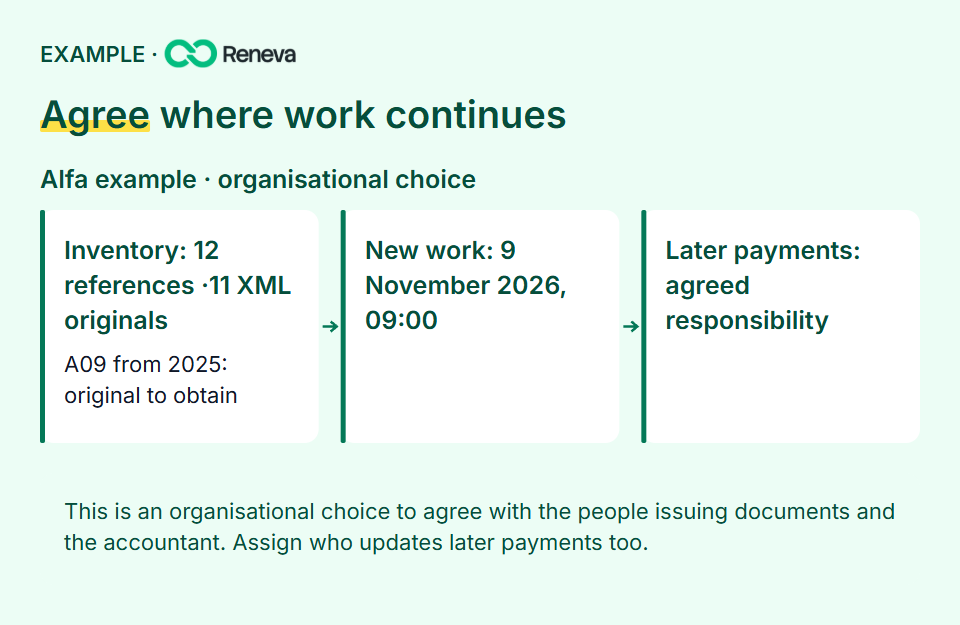
There are 11 original XML files available. The original for received document A09 from 2025 still needs to be obtained. Chiara keeps that record on the list and takes responsibility for finding the file: twelve records listed does not mean twelve documents already transferred.
Check how the data reaches the new tool
Read the official instructions for both tools: which categories and years can be transferred, in which formats and with what payment information? A backup file is useful only if the destination’s import process accepts it.
Also compare the original files and any information still to add. If you have a readable PDF, find out where to obtain the required XML. If you want to bring across a payment, check that its amount and actual date are available.
If you are moving to Reneva, the Import/Export guide describes the supported import routes and how to check the summary. The Fatture in Cloud connection imports existing data once; the details are in the guide to importing data from Fatture in Cloud.
The same Guide page explains Download everything, which retrieves data and documents from the companies you are allowed to access, organised by year, with CSV files for the sections. Analysis tables are exported from their own page. Compare the downloaded contents with your inventory, using the permissions available for each company.
Agree where to continue the work
In this example, Chiara proposes 9 November 2026 at 09:00 as the point from which new work will be handled in the destination tool. This is a fictional organisational choice to agree with the people issuing documents and the accountant, not a tax deadline.
Before confirming it, the person issuing documents notes the last document issued, the numbering series used and the settings to retain. They prepare a draft in the permitted environment to check the next steps, without issuing a tax invoice as a test or renumbering historical documents.
Also decide who will update payments that arrive later. If you continue to consult the old archive, make clear where new transactions will be recorded. The team needs to know which record to use and who maintains it.
Compare an initial group and its outstanding amounts
Before proceeding with the full scope of the move, check a few recognisable records. At Studio Alfa, the position verified before the agreed starting point is:
| Document | Amount due | Payment already verified | Expected balance | Due date in the example |
|---|---|---|---|---|
| F58, money to receive | €1,200 | €500 | €700 | 20 November 2026 |
| F59, money to receive | €600 | €0 | €600 | 25 November 2026 |
| A20, money to pay | €240 | €100 | €140 | 18 November 2026 |
The outstanding amounts are €1,300 to receive and €140 to pay. They relate to these documents; they are neither a bank balance nor profit.
Resolve the €100 difference on the same invoice
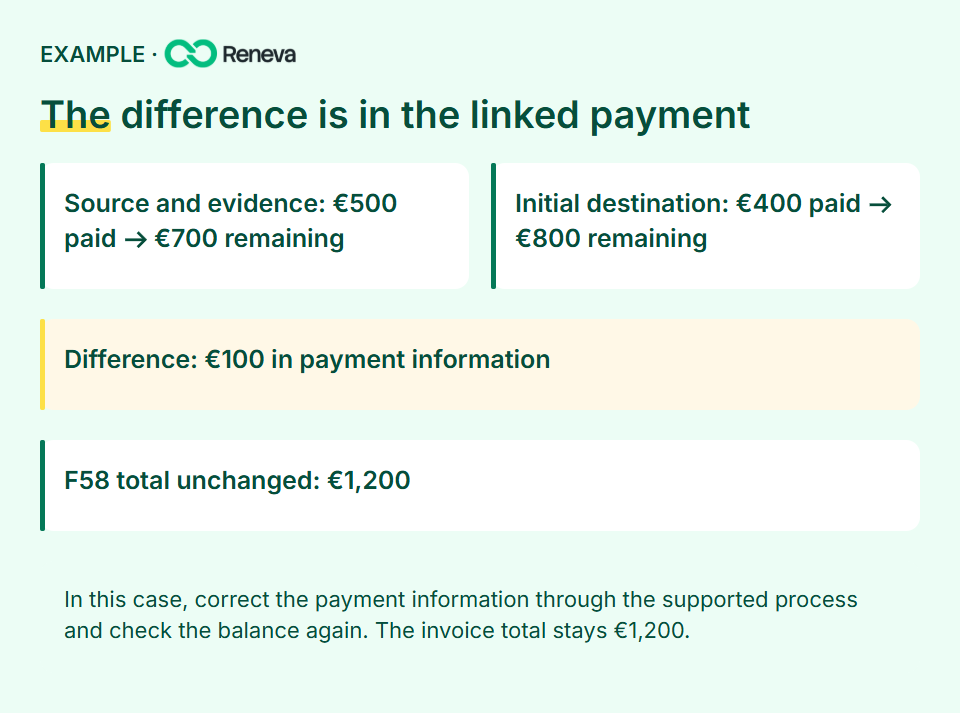
In the destination’s first summary, F58 shows €800 still to receive. The expected balance is €700, leaving a difference of €100.
Chiara and the adviser compare the payments linked to F58. In this example, the destination records €400 paid, while the source and the payment evidence show €500.
It is therefore the payment information that needs correcting, through the process supported by the tool. The invoice total remains €1,200. After the correction, they check the payment amount and date again, along with the €700 balance. Changing the invoice total to make the summary match would hide the discrepancy.
Check document delivery, access and the old archive
Before closing the previous service, assign responsibility for these checks:
- Document delivery: the person responsible checks the configuration and operation of the chosen channel with the provider.
- Access: each team member and the adviser must be able to do the required work in the correct company.
- Old archive: the administrative contact checks what will remain accessible and how to retrieve anything needed.
- Legal archiving: check the service actually used and its conditions after the previous service is closed.
Importing files does not automatically resolve these points. At Studio Alfa, the search for A09 stays on the list even if the other documents are already available in the destination.
Track the payment that arrives afterwards
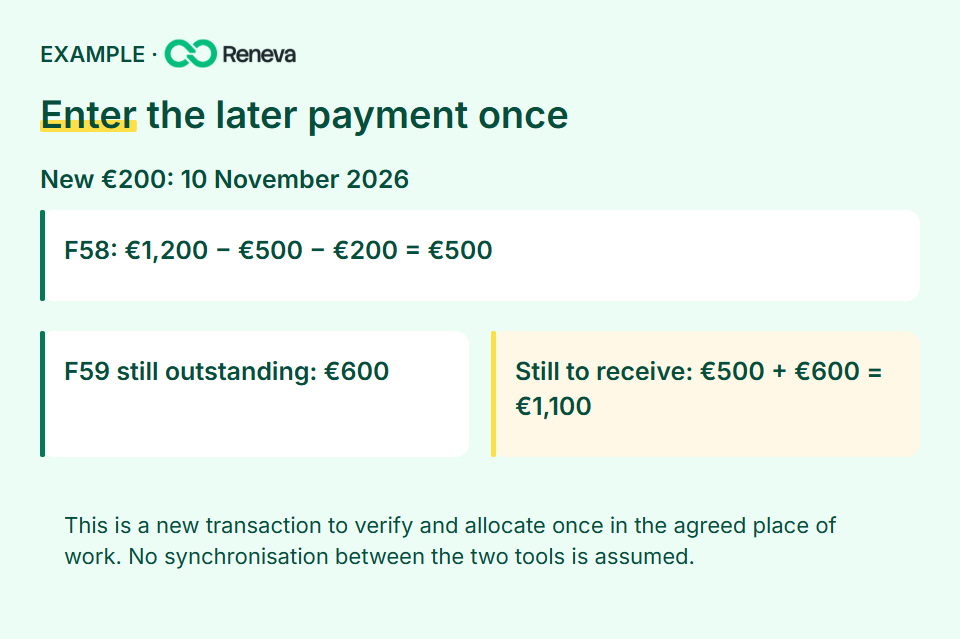
On 10 November 2026, in the example, a new €200 payment arrives for F58. The person responsible verifies the transaction and allocates it to the invoice once, in the agreed place of work.
F58’s outstanding balance falls from €700 to €500:
€1,200 − €500 already received − €200 newly received = €500.
With F59 still open for €600, the total remaining to receive becomes €1,100. The later €200 is a new transaction to track, without assuming that the two tools update one another.
Complete the agreed scope and keep remaining tasks visible
Return to the inventory and record which documents you have found, which originals are available and which amounts match the source. At Alfa, Chiara follows up A09; Chiara and the adviser resolve the F58 difference; the person issuing documents confirms where new work will begin; and the access and archive contacts report their answers.
The move is then ready to support your work: you know where to work, which data has been checked and who will complete the remaining tasks.


